Let AI Run Your Alarms
Ask Claude, OpenClaw, or any other MCP-compatible AI assistant to set, snooze, or cancel alarms — right from your chat. No more reaching for your phone.
What is VeliAlert?
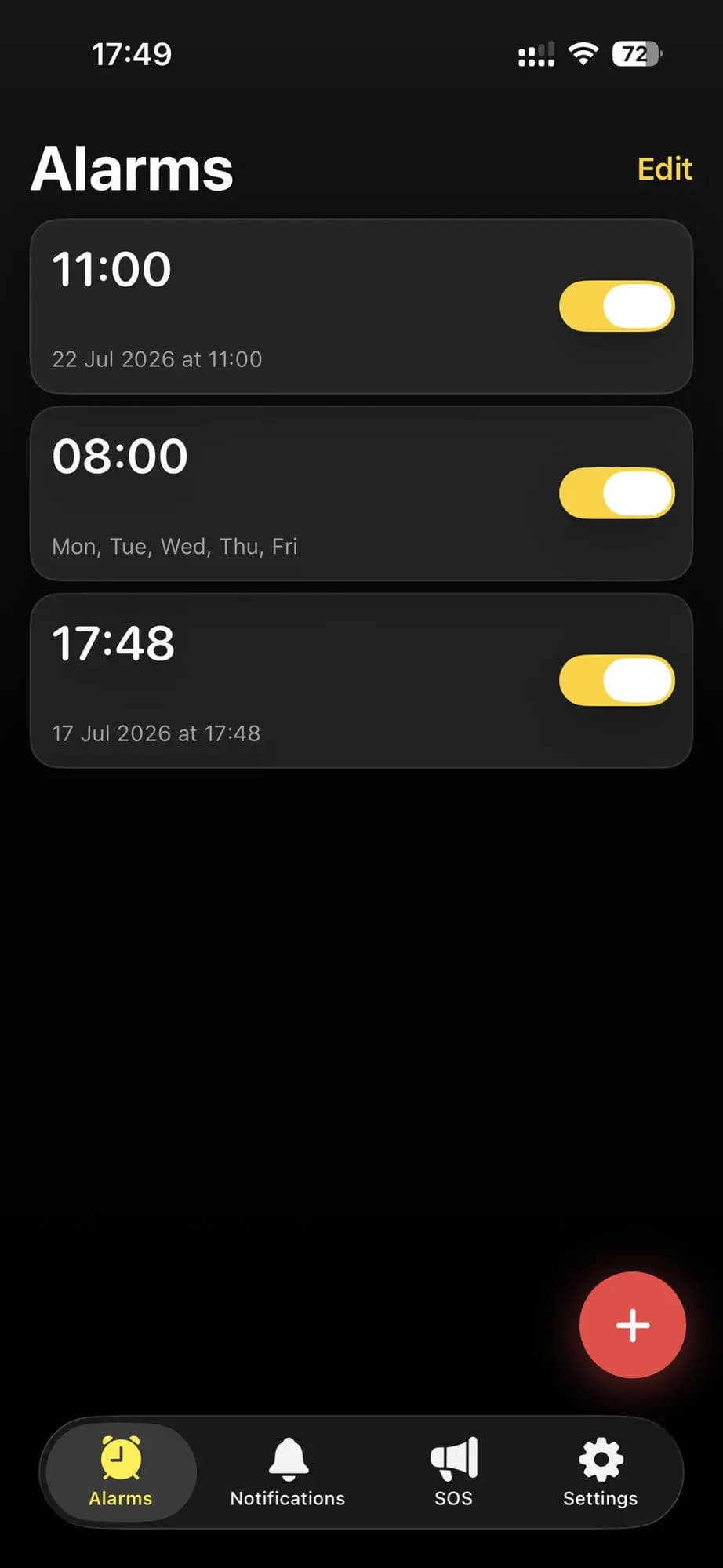
Set an alarm just by asking. VeliAlert lets you schedule alarms free, right on your phone, no account needed. Subscribe to remote control, and Claude or any other MCP-compatible AI assistant can set or snooze those alarms, send you a notification, or raise an SOS alert for you — straight from a conversation, through one secure link you control.
Overview
How it works
- 1
Set alarms — free, on your phone
VeliAlert works like any other alarm clock right out of the box: schedule an alarm for a specific time, trigger one instantly, snooze it, or cancel it — all local to your device, with no account and no subscription required. You can also view and manage any notifications or SOS alerts you've already received, for free.
- 2
Optionally subscribe, then generate a scoped link
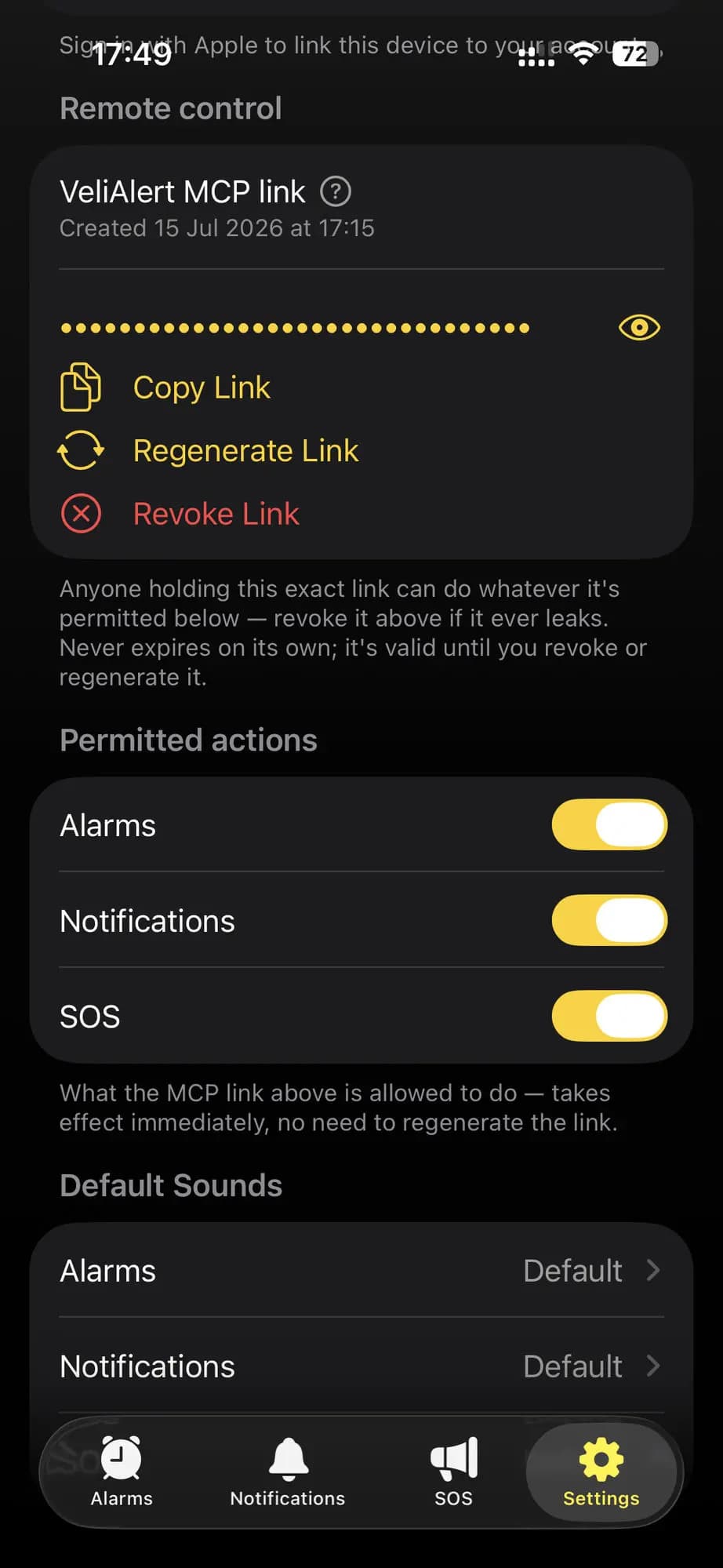
Want an AI assistant to run your alarms, send you notifications, or raise an SOS for you? Subscribe to remote control, then open Settings and tap Generate MCP Link. That mints one URL, scoped to exactly your device and a handful of actions — shown once, never stored in plain text.
- 3
Paste it into Claude, or any other MCP-compatible client
Add that link to Claude, or any other MCP-compatible client, and it can set, snooze, cancel, or trigger your alarms, send you a notification, or raise an SOS alert — right from chat, wherever you are. Revoke the link anytime from the same Settings screen; it's independent of everything else.
Remote control
Everything remote control unlocks
Subscribe once, and any MCP-compatible AI assistant can act on your alarms exactly like you would yourself — all from a normal conversation instead of the app’s own UI.
Set alarms just by asking. Tell Claude, or any other MCP-compatible AI assistant, what time to wake up or when to be reminded — it sets the alarm on your phone instantly, no typing on a tiny screen required.
Snooze or cancel hands-free. Running late, in a meeting, or nowhere near your phone? Ask your AI assistant to snooze or cancel an alarm for you, and it happens immediately, without you touching the device at all.
Notifications from anywhere. Have your AI assistant push a notification to your phone whenever it needs your attention — a reminder, a status update, anything — delivered straight to your lock screen.
Instant SOS, on command. Your AI assistant can send an SOS alert to your phone whenever it's needed — it fires right away. Useful for urgently getting your attention, or getting help sent fast.
Works with your AI tools. VeliAlert speaks the Model Context Protocol (MCP), so it works with Claude, OpenClaw, and any other MCP-compatible assistant — no special integration needed on their end.
Setup
Connect your AI assistant
The Model Context Protocol (MCP) is an open standard that lets AI assistants call real tools instead of just talking about them. VeliAlert exposes one link that speaks MCP — generate it once from Settings, no API keys to manage, and revoke it anytime.
Claude Code
Register the link as an MCP server with one command in your terminal:
$ claude mcp add --transport http velialert <your-link>OpenClaw
Same idea, one command in your terminal:
$ openclaw mcp add velialert --url <your-link> --transport streamable-httpOther MCP clients
Open your client’s MCP server settings and paste the same link there — any client that speaks MCP works the same way.
Privacy
Private by design
Setting alarms is free and fully local — no account, ever. Remote control needs an account only to verify your subscription, and collects nothing beyond what that requires.
Push token, yours alone. Delivers your own alarm and SOS notifications — never used to reach any other device.
Apple Sign-In, only if you subscribe. The one prerequisite for remote control; never required for alarms, notifications, or SOS.
Crash reports, not behavior tracking. Error diagnostics only — performance and usage tracking are fully disabled, everywhere.
No ads, no data sale, ever. No third-party advertising or analytics SDK of any kind, full stop.
FAQ
Frequently asked questions
VeliAlert is an iOS alarm app. Setting, editing, and managing alarms is free and works entirely on-device, with no account ever required. Its one paid feature is optional: a subscription that lets an AI assistant such as Claude set or snooze your alarms, send you notifications, or raise SOS alerts for you, remotely.
No. Setting, editing, snoozing, and cancelling alarms is free and fully local to your device — no sign-in required. Viewing and managing notifications or SOS alerts you've already received is free too. Sending yourself a new notification or raising a new SOS alert, though, only happens through an AI assistant, as part of the paid remote-control subscription — there's no button for either in the app itself.
After subscribing, open Settings in the app and tap Generate MCP Link. This creates one URL scoped to exactly your device and a small set of alarm actions (set, snooze, cancel, trigger, and list alarms). Paste that URL into Claude, or any other MCP-compatible AI assistant, and it can act on your alarms directly from chat. You can revoke the link at any time from the same Settings screen, independent of anything else in your account.
Alarms that are already set always ring — the app hands each one to iOS's own alarm system ahead of time, so it fires even with the app in the background, the phone locked, or no internet at the alarm's moment. The one thing to avoid is force-quitting the app from the app switcher: iOS then blocks the background updates that arm newly created remote alarms, so an alarm your AI assistant sets after that arrives as a loud push notification at fire time instead of the full-screen alarm, until you next open the app. The same applies whenever Low Power Mode is on or the battery is below 20% — iOS pauses those same background updates, so a remote alarm set during that time can also arrive as a push notification instead of ringing. Simply leaving the app in the background, with Low Power Mode off, keeps everything fully working.
Subscriptions are billed and managed entirely through Apple, not through this website. Open the Settings app on your iPhone, tap your name, tap Subscriptions, choose VeliAlert, and tap Cancel Subscription. Apple's own official instructions are at support.apple.com/en-us/HT202039.
Yes. Every remote-control subscription plan includes a 7-day free trial before you're charged.
No. VeliAlert has no advertising, no third-party analytics SDK, and never sells or shares personal data. See the Privacy Policy for exactly what data is collected and why.
Manage or cancel your subscription
Remote-control subscriptions are billed and managed entirely through Apple, not through this website. Follow Apple’s own official instructions to view, change, or cancel any subscription:
support.apple.com/en-us/HT202039Let AI run your alarms
Setting alarms is free forever. Letting an AI assistant run them — plus send you notifications or raise an SOS — is one optional subscription away, with a 7-day free trial.